Digital Download + Mini Course
Accelerated Pixel Casting in RealityKit
Done-For-You ready to use Swift Package and Example Project for DRAWING and much more!
Write your awesome label here.
Click here to enroll
Get immediate Access
Included with purchase
PixelCastKit
Includes a high-performance ray casting library for RealityKit that provides fast, accurate ray-triangle intersections with BVH acceleration.
Write your awesome label here.
Use Cases
These are a few ways pixel casting can be used, but you may find use cases beyond this!
-
Drawing on geometry (aka Texture Painting, as seen in the example app in this course.)
-
Applying decals where objects intersect surfaces: bullet holes, paint splatter, dust or residue, tire tracks, footprints, etc.
-
Capturing signatures or annotations directly onto NFT-backed assets for provenance.
-
Driving a virtual cursor or highlight that hovers precisely over the triangle a user is targeting before they confirm an interaction.
-
Selecting an anchor point on an entity to attach tools, accessories, or procedural content in response to user input.
-
Occlusion-aware hit testing for shooting, interaction rays, or sensor simulations.
-
Measuring distances or sampling surface data (normals, UVs) for effects.
Key Features
PixelCastKit comes loaded with useful features
-
Scene-Wide Casting: Cast rays against all entities in a scene - with filtering support.
-
Single Entity Casting: Target specific entities for performant intersection testing when the whole Scene is not required.
-
Rich hit data, such as: Barycentric coordinates, normal, world position, UV, distance, and the entity which was hit.
-
Filtering: Group-based entity filtering using `PixelCastGroup` and `PixelCastFilter`
-
Front/Back Face Culling: Optional control over which triangle faces register hits.
Why PixelCastKit?
Not available on visionOS as of version 26
Supports visionOS 2.0+, iOS 18.0+, macOS 15.0+, tvOS 26.0+
Only one path available
Brute-force and BVH-Accelerated paths available
BVH acceleration was experimentally proven to save 98.88% of the time required by the brute-force method.
Takes over 30 milliseconds per cast.
Takes less than 1 ms per cast with BVH acceleration.
Does not work on disabled Entities
Lets you decide whether to include disabled entities or not.
For example, the example course uses this to only enable Entities for surfaces that have been drawn on, improving performance.
Write your awesome label here.
Look inside
Sneek Peak
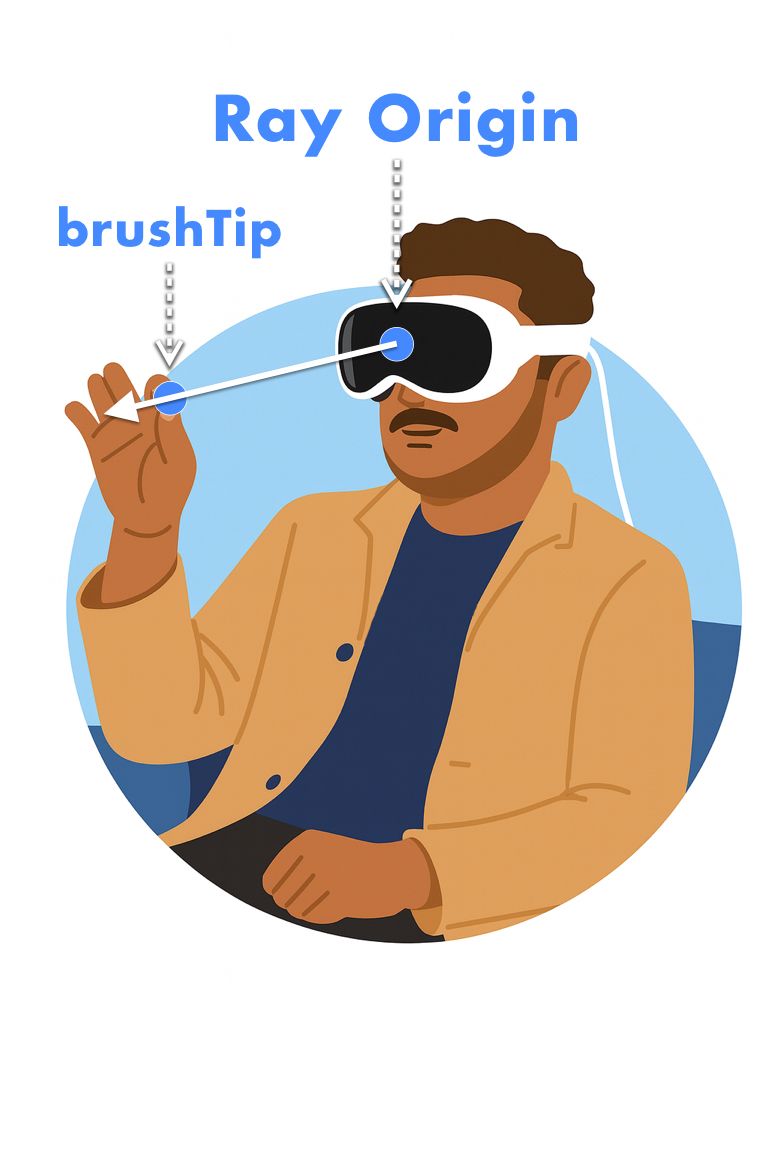
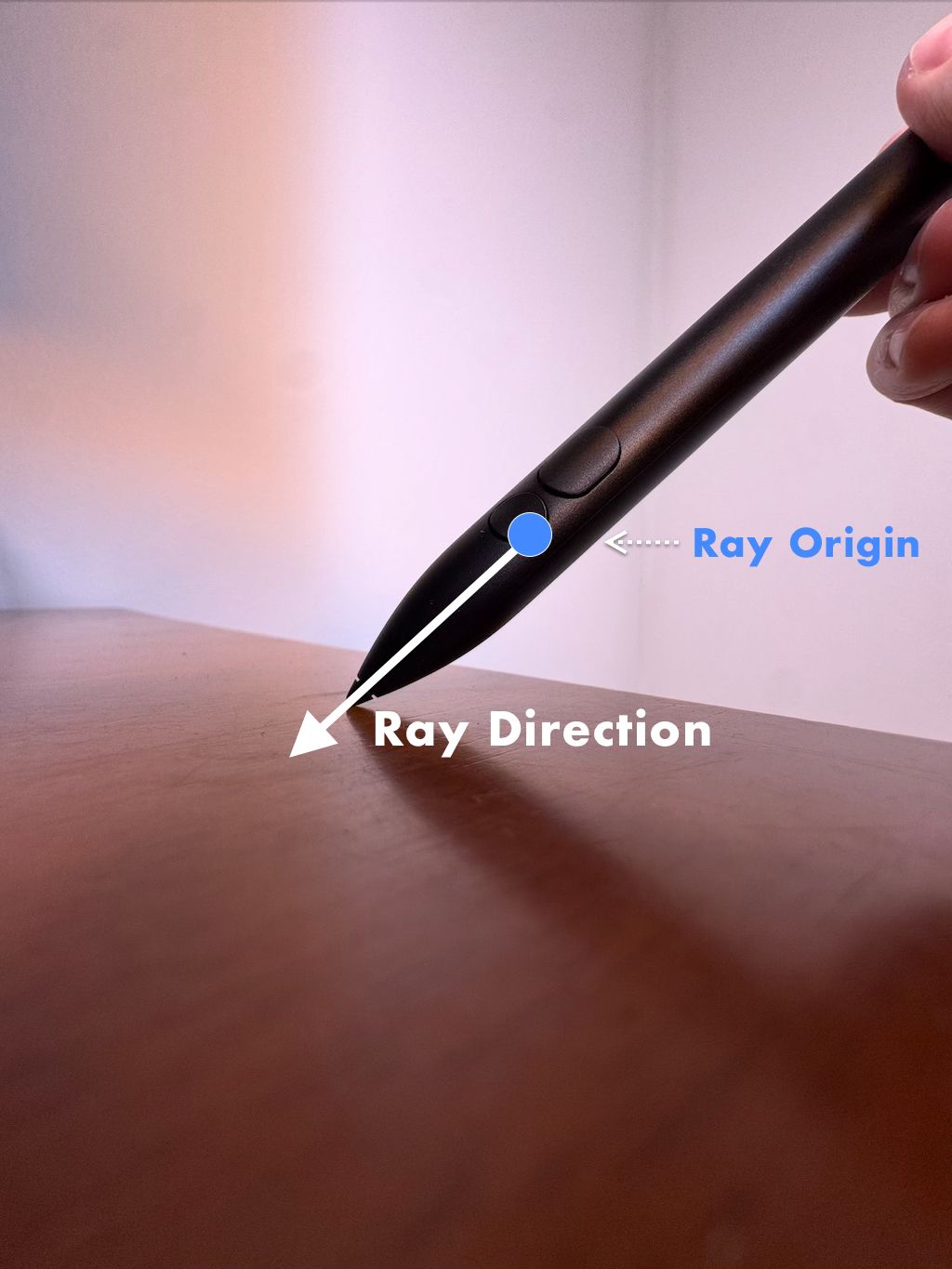
Diagrams to help visualize raycasting.
Benefits
Does not provide UV's for plane or scene reconstruction meshes
Provides UV's in a done-for-you package called RKMesh - with multiple projection modes available.
No automatic connection to Spatial Accessory
Handles connection to Logitech Muse through SpatialAccessory package.
Optimized Mini Course
Delivery through text articles with diagrams and code blocks instead of (slower) videos.
Thorough explanation of production level example project.
Thorough explanation of production level example project.
Learn How To Use Logitech Muse *NEW*
Discover the meaning of accessory locations. Learn how to gather and apply input from the device.
Learn How To Use LowLevelTexture
Enable real-time performant updates with LowLevelTexture acceleration
What's Inside
Course Contents
Meet the instructor
Grant Jarvis
Grant found his passion for AR while studying at Rice University, and his dedication has led to becoming an expert in iOS AR app development. His primary intention at Reality Academy is to help improve his students so that they can make better apps, but also enjoy the learning experience and learn how to become better learners. The typical lesson with Grant typically involves much more than just the basics, encompassing such essential elements as understanding the code and structuring the app in a robust manner.
*Logitech Muse and Apple Vision Pro are not included with purchase.
**RealityKit and ARKit are trademarks of Apple Inc. This course is an independent educational resource and is not affiliated with, endorsed by, or sponsored by Apple Inc.
Pixel casting currently only works with triangular meshes. Submit a request if your project requires quads.
Does not work with deformed meshes (bones/armatures or geometry/vertex shaders).
Created with